Ruttl alternatives: 6 website feedback tools for 2026
ruttl does a lot for its price, but per-user billing and a tight free plan push some teams to look around. Here are six alternatives, with prices we checked on each company's own site on 13 November 2026.
Why people look for a ruttl alternative
ruttl covers a lot of ground: websites, web apps, images, PDFs and now native mobile apps, plus live CSS edits and a bug board. For many teams that breadth is the reason to pick it. The reasons people look elsewhere tend to be practical ones.
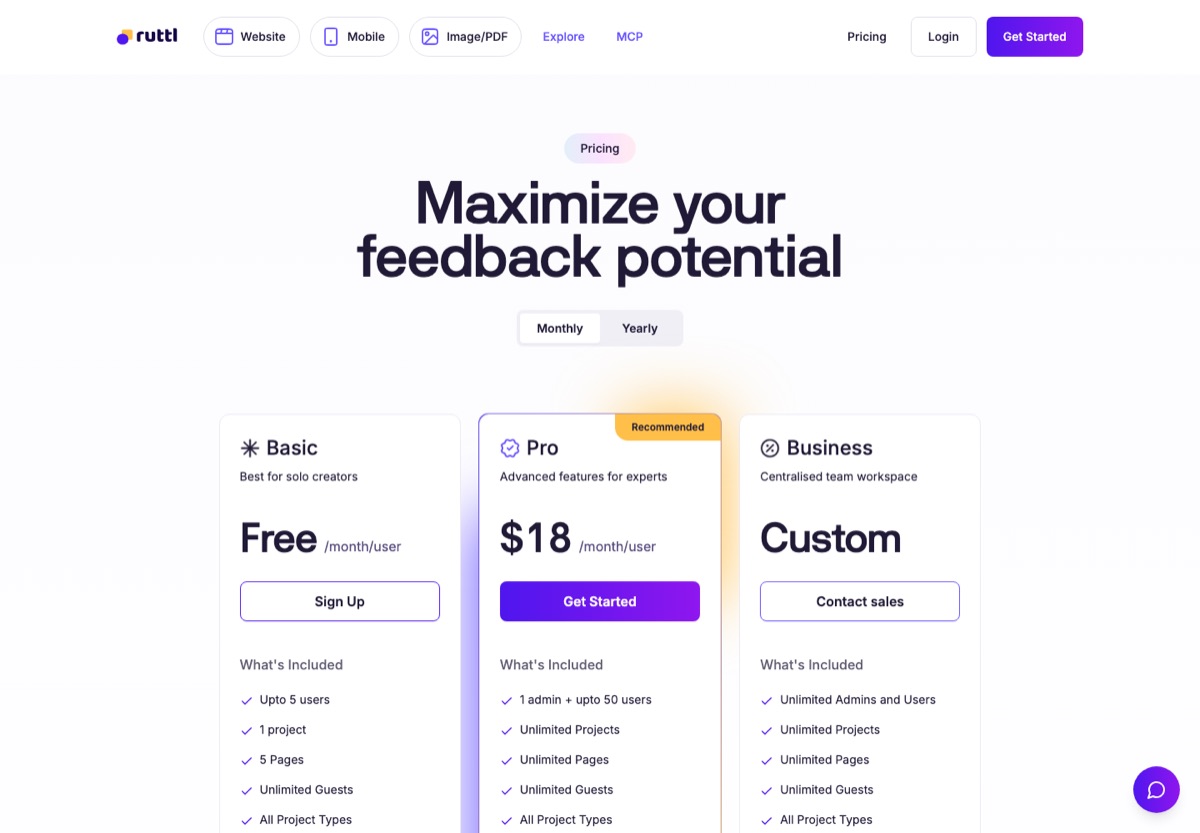
- Per-user pricing. Pro is $18 per user a month, or $15 billed yearly. A team of five pays $90 a month on monthly billing, and the bill grows with every person you add.
- A tight free plan. The free Basic plan allows 1 project, 5 pages and 10 comments, which is enough to try it but not to run real client work.
- Phone layouts are a paid feature. ruttl lists its 15 device sizes and mobile responsiveness under Pro and Business, not on the free plan.
- You only need part of it. If your work is websites, landing pages and PDFs, the app and video tools are things you pay for and never open.
What to look for in a replacement
- No account for reviewers. Clients should click a link and comment, with nothing to sign up for or install.
- Comments pinned to the page. A note attached to the exact heading or button, not a screenshot sent in an email.
- Phone and tablet views. Most visitors are on phones, so reviewers need to see and comment on the mobile layout.
- A price that fits your team size. Work out the cost for your real number of people, not the headline price.
- The file types you actually review. Websites only, or PDFs, images and video too.
1. HTMLAnnotate
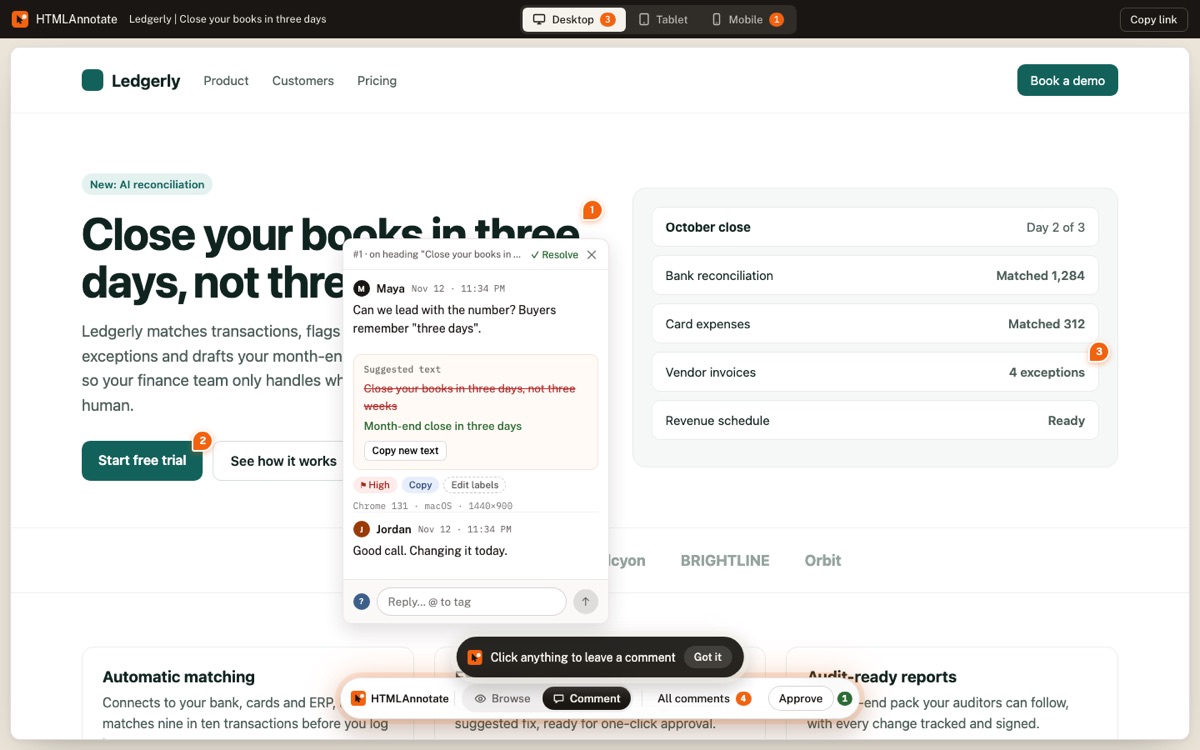
This is our tool, so read this entry with that in mind. You paste a website link or upload an HTML file or a PDF, send the review link, and reviewers click any element to leave a comment, with no account. Desktop, tablet and phone comments are kept apart, each comment saves a screenshot of what the reviewer saw, and you can publish new versions on the same link and collect approvals.
It is also built for pages that AI tools write. Through its MCP server, Claude, ChatGPT or Cursor can share a page for review and read the comments back.
Price: free for 3 projects with unlimited pages and reviewers. Pro is $10 a month ($8 billed yearly) for two people. Team is $20 a month ($16 billed yearly) for up to 10 people.
Good fit if: you review websites, staging sites or HTML files and want one flat price for the team. Not a fit if: you also need images, video or native apps reviewed in the same tool. HTMLAnnotate vs ruttl in detail.
2. Pastel
A long-standing tool for agencies that review client websites. Pastel loads the live site through a share link, so there is nothing to install, and reviewers comment without logging in. Its responsive tester lets people comment on mobile, tablet and desktop views, and that is included on the free plan. It also handles images, PDFs and video.
Price: free for 1 user and 1 canvas. Pro is $35 a month ($29 billed yearly) for 2 users and 3 canvases. Team is $119 a month ($99 billed yearly) and starts at 5 users, with extra users at $24 each.
Good fit if: you run an agency and want a mature client workflow with approvals and deadlines. Watch out for: the 3-canvas limit on Pro, and the jump to $119 a month once you need a third person. HTMLAnnotate vs Pastel.
3. Markup.io
The alternative with the widest file support. Markup.io reviews live websites, images, PDFs, video and more than 30 file types, with unlimited users and guests who never sign up. It offers desktop, tablet and mobile previews.
Price: no free plan on its pricing page. Pro is $79 a month for 50 MarkUps, with higher tiers at $99 and $129 a month. Business starts at $499 a month. 14-day trial.
Good fit if: you review many file types and have a large team, so unlimited users matter more than the monthly price. Watch out for: usage caps on MarkUps per month. HTMLAnnotate vs Markup.io.
4. BugHerd
Feedback that turns into tasks. Every comment lands on a kanban board, with the screenshot, browser and device captured automatically, and BugHerd connects to Jira, Asana, Trello, ClickUp, GitHub and Slack. It works through a small script on your site or a browser extension, and guests comment without an account.
Price: no free plan. Standard is $50 a month ($42 billed yearly) for 5 members, Studio is $80 a month ($67 yearly) for 10, and Premium is $150 a month ($125 yearly) for 25. Guests are unlimited.
Good fit if: developers fix feedback as tickets and you want it in the tools they already use. Watch out for: adding a script to every site you review. HTMLAnnotate vs BugHerd.
5. Marker.io
Bug reporting for web teams. A widget on your site or a browser extension captures a screenshot, console logs and network requests, then sends the report straight to Jira, Trello, Asana, GitHub and others. Clients can report without an account. Marker.io has also added session replay and an MCP server.
Price: no free plan. Starter is $59 a month ($39 billed yearly) for 3 members. Team is $199 a month ($149 yearly) for 15 members, and eligible agencies can get an Agency plan at $129 a month ($99 yearly). 15-day trial.
Good fit if: QA and developers are the main users and you want technical detail on every report. Watch out for: it is built for bug reports more than client approval rounds. HTMLAnnotate vs Marker.io.
6. Userback
A feedback widget for websites and web apps, with screenshots, video, session replay, surveys and a feature request portal. Reporters never need an account or a seat. It suits product teams collecting feedback from users as much as agencies collecting it from clients.
Price: a free plan with 2 sites and 2 seats, but feedback stays visible for 7 days. Team is $49 a month ($39 billed yearly) for 5 seats, Business is $119 a month ($89 yearly) for 15 seats.
Good fit if: you want client feedback and user research in one product. Watch out for: it needs a widget on your site, and the free plan's 7-day limit.
What each tool costs for your team
Monthly billing, the cheapest plan that fits each team size, for the people creating reviews. Reviewers are free in every tool here. Checked on each company's pricing page on 13 November 2026.
| Tool | Free plan | 1 person | 3 people | 10 people |
|---|---|---|---|---|
| ruttl | Yes, 1 project | $18 | $54 | $180 |
| HTMLAnnotate | Yes, 3 projects | $10 | $20 | $20 |
| Pastel | Yes, 1 canvas | $35 | $119 | $239 |
| Markup.io | No | $79 | $79 | $79 |
| BugHerd | No | $50 | $50 | $80 |
| Marker.io | No | $59 | $59 | $199 |
| Userback | Yes, 7-day history | $49 | $49 | $119 |
Markup.io's price includes unlimited users but caps MarkUps at 50 a month. Pastel's 10-person price is the Team plan plus five extra users at $24 each. Yearly billing lowers most of these by 15 to 35 percent.
Which one should you pick?
- Websites only, small team, tight budget: HTMLAnnotate.
- An agency that wants a polished client process: Pastel.
- Many file types and a big team: Markup.io, or stay on ruttl.
- Developers working from a ticket board: BugHerd or Marker.io.
- Client feedback plus user research: Userback.
How to switch without losing work
- Finish the reviews that are open in ruttl, or copy out the comments you still need.
- Paste the same page links into the new tool and create fresh review links.
- Send the new links to your reviewers, and tell them nothing changes on their side if the new tool needs no account.
- Cancel ruttl once your open projects are done, so you don't pay for two tools.
Questions
Does ruttl have a free plan?
Yes. Its Basic plan is free, with 1 project, 5 pages and 10 comments. The plan card says up to 5 users, while the comparison table on the same page says 1 user, so check the current limits before you rely on it.
How much does ruttl cost?
ruttl Pro is $18 per user a month billed monthly, or $15 per user a month billed yearly, for up to 50 users. Business pricing is on request. Prices checked on ruttl.com on 13 November 2026.
What is the cheapest ruttl alternative for a team?
For a team of three to ten people, HTMLAnnotate Team is $20 a month in total, or $16 billed yearly. Most other tools charge per seat or start above $40 a month.
Which ruttl alternative also reviews PDFs and video?
Markup.io and Pastel both handle images, PDFs and video as well as websites. BugHerd covers PDFs, images and Figma. HTMLAnnotate reviews websites, HTML files and PDFs, but not images or video.
Do reviewers need an account in these tools?
No. Every tool in this list lets clients comment without creating an account, though some need a script on your site or a browser extension for your own team.
Try HTMLAnnotate on a real page. Free for 3 projects, and reviewers never need an account.
Start a free review