HTMLAnnotate vs Pastel
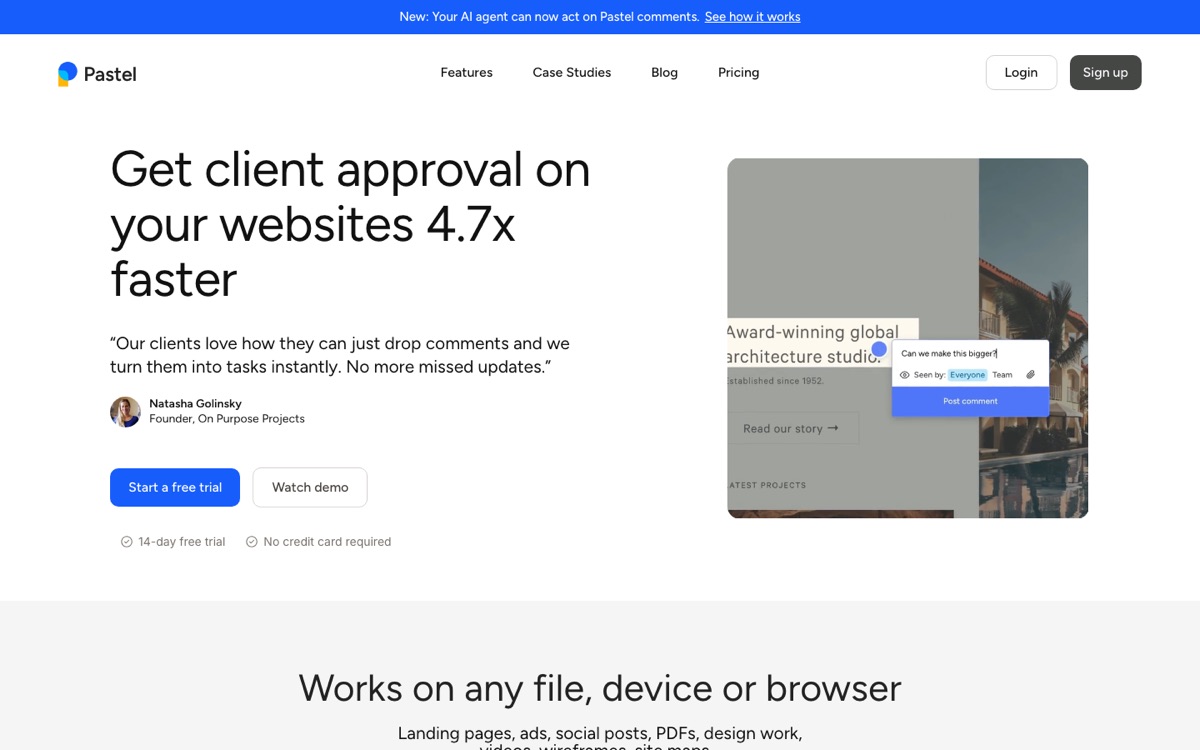
Pastel is a popular website feedback tool for agencies and designers. HTMLAnnotate covers the same core job, comments pinned to a live site, at a lower price, with separate comments for desktop, tablet and phone.
Last checked 12 November 2026. Details about Pastel come from its public website and independent reviews, and can change. Check usepastel.com for the latest.
The short answer
The two tools work in a similar way: paste a link, share it, and reviewers click to comment. HTMLAnnotate is cheaper, gives you 3 projects with unlimited pages on the free plan, and keeps phone comments apart from desktop ones. Pastel is the more established tool, with a larger team behind it.
Pick HTMLAnnotate if
- You want 3 projects with unlimited pages on the free plan
- You want links that never expire for about $8 to $10 a month
- You review HTML files written by AI tools as well as live sites
- You want separate comments for each screen size
Pick Pastel if
- Your team already runs its client reviews in Pastel
- You want a long-established vendor with a larger team
- You rely on a specific Pastel integration
What each one looks like
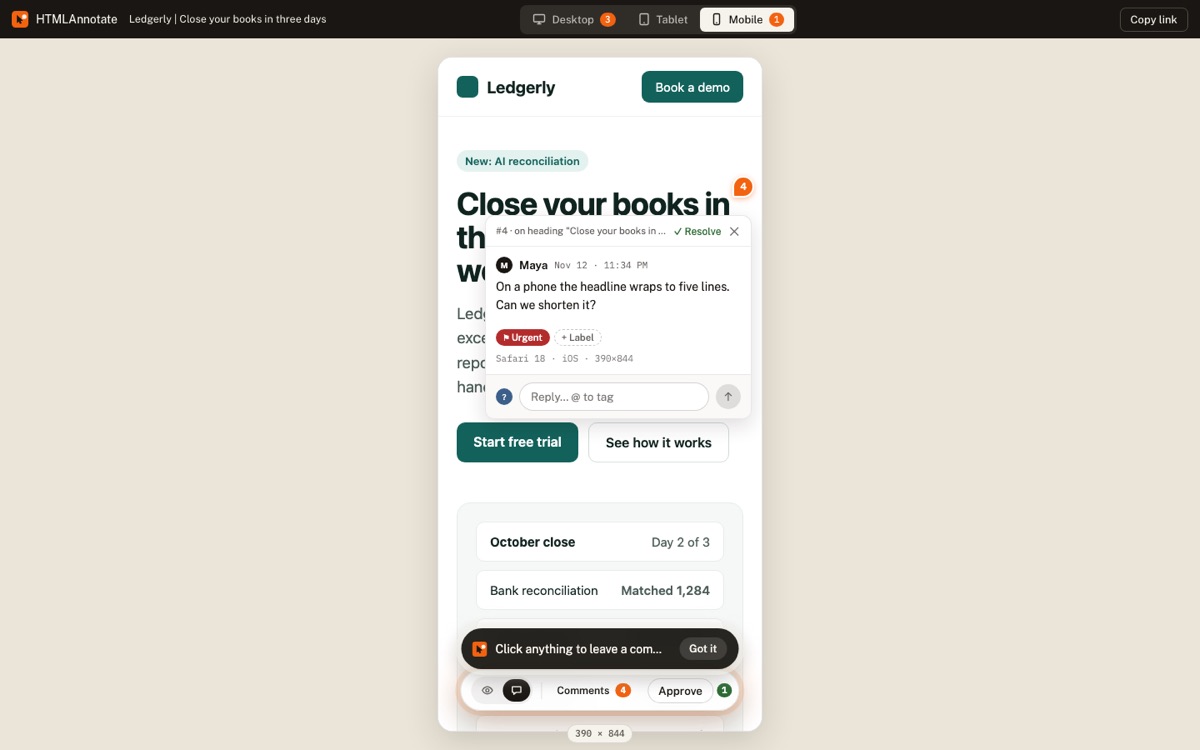
Both tools load your site and let reviewers comment on it in place. The main visible difference in HTMLAnnotate is the Desktop, Tablet and Mobile switch at the top, where each view keeps its own comments.
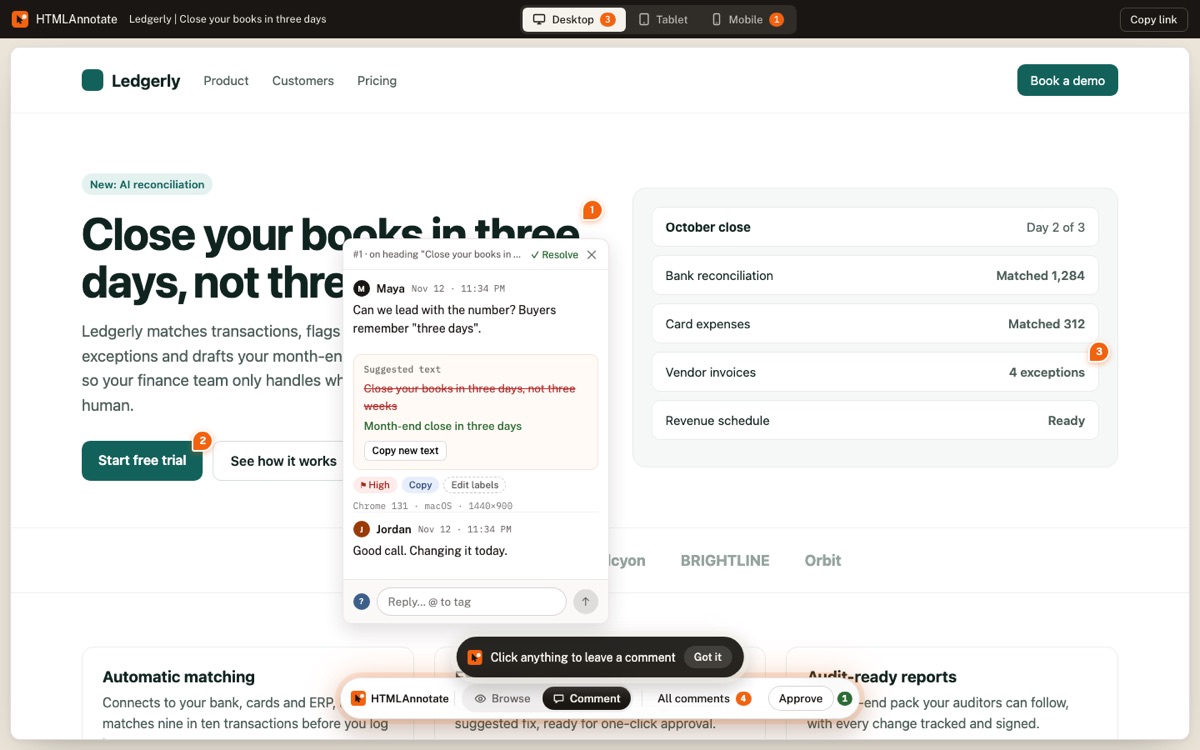
HTMLAnnotate opens the page itself, not a screenshot of it. Reviewers click the heading, image or button they mean and type. Each comment is pinned to that exact element and numbered on the page.
Pricing
Pastel's plans page lists a free plan for 1 user and 1 canvas, Pro at $35 a month for 2 users and 3 canvases, Team from $119 a month starting at 5 users with unlimited canvases, and Enterprise from $450 a month. Yearly billing is available.
Pastel
Free: 1 user, 1 canvas. Pro: $35 a month, 2 users, 3 canvases. Team: from $119 a month, from 5 users, unlimited canvases. Enterprise: from $450 a month.
HTMLAnnotate
- Free: 3 projects with unlimited pages, comments and reviewers; links last up to 14 days.
- Pro: $10 a month, or $8 a month billed yearly; you plus one teammate; links never expire.
- Team: $20 a month, or $16 a month billed yearly; up to 10 people; links never expire.
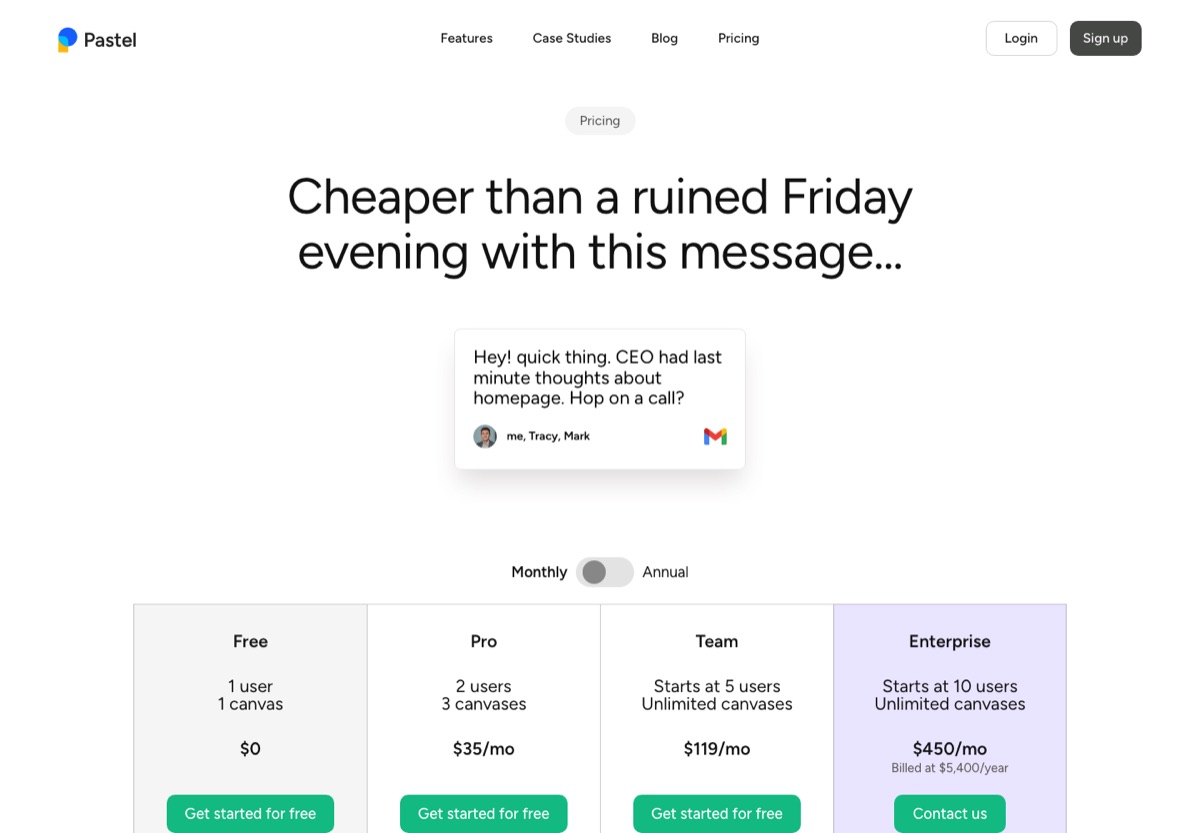
Like for like, HTMLAnnotate Pro is $10 a month for two people with unlimited projects, against $35 a month for two people and three canvases. The HTMLAnnotate free plan also has no limit on pages.
Features side by side
A quick view of what each tool covers, from public information checked on 14 November 2026. Sources are under the table.
| Feature | HTMLAnnotate | Pastel |
|---|---|---|
| Free plan | Yes | Yes |
| Reviewers need an account | No | No |
| Code or extension on your site | No | No |
| Separate desktop, tablet and phone comments | Yes | Yes |
| Live sites with scripts and animations | Yes | Yes, with Browse and Comment modes |
| Upload a single HTML file | Yes | Only through an AI agent (its command-line tool or MCP) |
| Suggested text edits | Yes | Yes |
| Approvals | Yes | Yes, approve or request changes |
| @mentions with email | Yes | Yes |
| Labels and priority | Yes | Yes |
| AI-ready brief of comments | Yes, plus an MCP connector | Yes, an AI agent connection |
| CSV export | Yes | Yes |
| Integrations (Jira, Slack and similar) | Not yet | Yes |
| PDF and image review | PDFs (not images) | Yes, plus email and video |
Sources: Pastel’s own help docs, pricing and feature pages, its Chrome Web Store listing where it has one, and user reviews and forum threads, checked on 14 November 2026. “No sign of it” means we found nothing in its docs, pricing or reviews. Main pages used: help.usepastel.com, usepastel.com, help.usepastel.com (2), help.usepastel.com (3), help.usepastel.com (4). Features change: check Pastel’s site before you decide, and tell us if something here is out of date.
Where Pastel is strong
- A mature, well-known tool used by many agencies.
- Useful extras like deadlines, file attachments on comments and a responsive tester.
- Labels, CSV export and integrations with common project tools.
Where HTMLAnnotate is different
- Phone feedback stays on the phone. Every review link has Desktop, Tablet and Mobile views, and a comment left in one view only shows in that view. A note about the mobile menu never lands on the desktop layout.
- Live pages, not frozen copies. Imported sites run with their own scripts, so animations, sliders and menus work while people review.
- Made for AI-written pages. Upload the HTML file ChatGPT or Claude wrote, collect comments, then press Copy for AI to turn them into a brief the AI can act on.
- Small-team pricing. Pro is $8 a month billed yearly, with links that never expire. Reviewers are always free.
The reviewer experience
Pastel reviewers do not need an account, which is one of the things it is known for. HTMLAnnotate works the same way here.
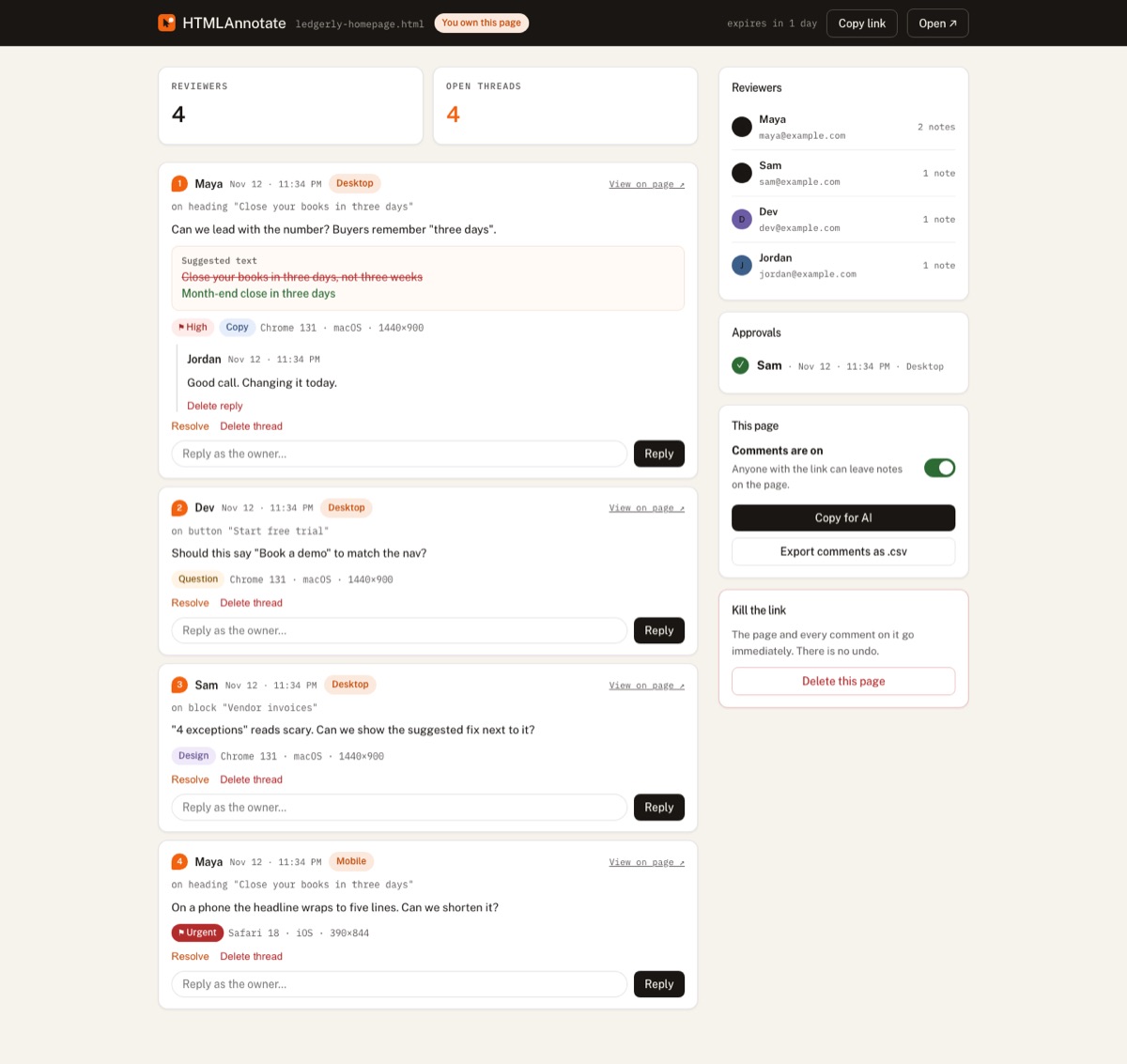
On HTMLAnnotate, a reviewer opens the link, clicks anything on the page and types. The first time, they give a name and an email so you know who said what. After that they comment on every page you send. They can reply to threads, suggest exact new wording, tag teammates with @, and press Approve when the page is right.
Setup and workflow
With Pastel
- Create a canvas and paste the website address.
- Share the canvas link with your client.
- Collect and resolve comments in Pastel.
With HTMLAnnotate
- Paste the page address (live or staging) or upload an HTML file at htmlannotate.com/new.
- Copy the review link and send it to your client or team.
- Read every comment on the manage page, reply, resolve, and export or Copy for AI when you are ready to make changes.
Switching to HTMLAnnotate
If you are moving from Pastel, paste the same page addresses into HTMLAnnotate and send the new links. Old Pastel canvases stay where they are, so you can finish open reviews before switching fully.
- Sign in at htmlannotate.com with Google or an email code.
- Paste the address of each page you are reviewing. There is nothing to install or remove from your site.
- Send the new review links. Reviewers need no account.
- If you work with a team, create a team on the Team page (Pro or Team plan) and share projects with it.
Questions
Is HTMLAnnotate cheaper than Pastel?
Usually. HTMLAnnotate Pro is $10 a month, or $8 billed yearly, for two people with unlimited projects. Check Pastel's plans page for its current prices.
Does HTMLAnnotate work like Pastel?
The core idea is the same. HTMLAnnotate adds separate desktop, tablet and phone comments, suggested text edits, approvals and Copy for AI.
Is there a page limit on the free plan?
No. HTMLAnnotate Free has 3 projects with unlimited pages; links last up to 14 days.
Can my clients approve a page?
Yes. Reviewers press Approve, and you see who approved and when on the manage page.
Do I need to install anything?
No. Nothing goes on your site and reviewers need no extension.
Try it on a real page. Free, and your reviewers never need an account.
Import a page