Markup.io vs Pastel: an honest comparison
Markup.io and Pastel are two of the best-known tools for collecting feedback on websites and creative files. They suit different teams. Here is how they compare, with prices checked on each company's site on 13 November 2026.
At a glance
| Markup.io | Pastel | |
|---|---|---|
| Free plan | Not on the pricing page | Yes, 1 user and 1 canvas |
| Free trial | 14 days | 14 days |
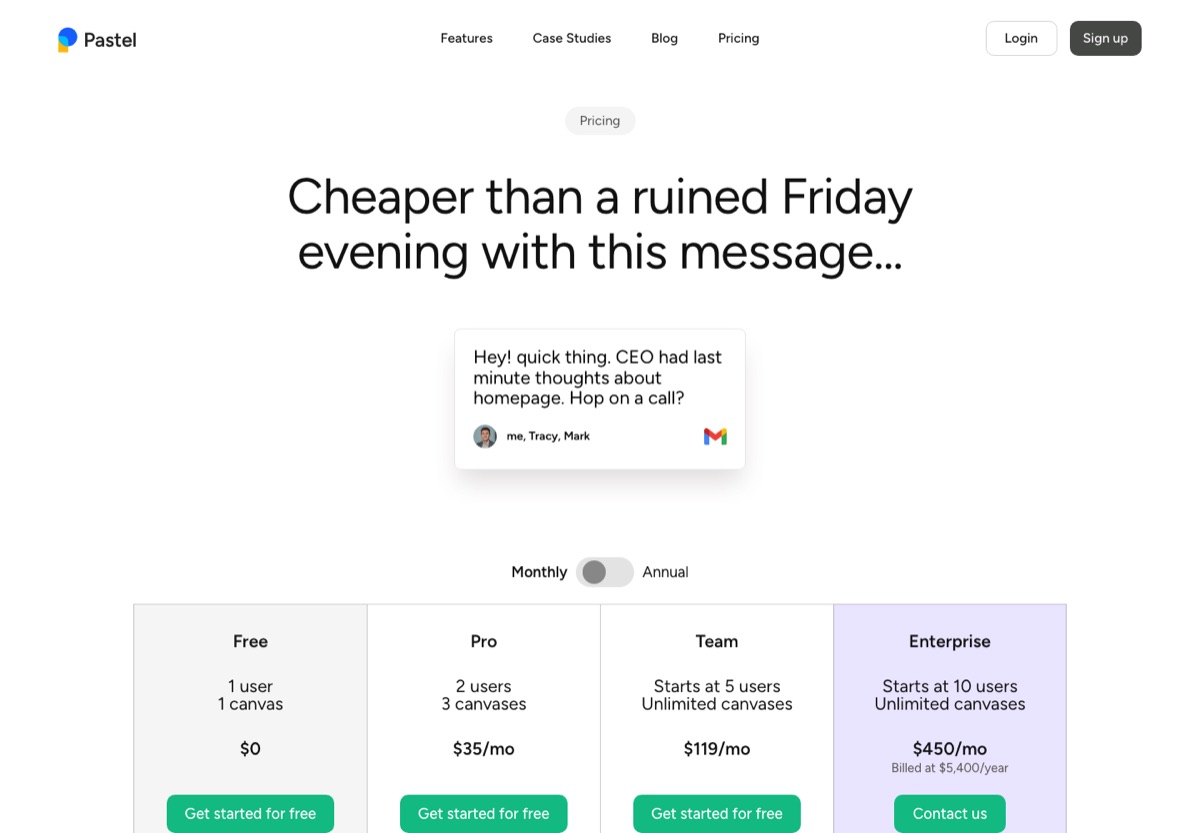
| Entry paid plan | $79 a month, unlimited users, 50 MarkUps | $35 a month, 2 users, 3 canvases |
| Team plan | Business from $499 a month | $119 a month from 5 users, $24 per extra user |
| How it limits use | MarkUps per month | Users and active canvases |
| Clients need an account | No | No |
| What you can review | Websites, images, PDFs, video, 30+ file types | Websites, images, PDFs, video |
| Phone and tablet views | Desktop, tablet and mobile previews | Responsive tester on every plan |
| Nothing to install on the site | Yes, plus an optional Chrome extension | Yes |
Prices are billed monthly, in US dollars, as shown on each pricing page on 13 November 2026. Markup.io lists yearly billing as two months free. Pastel's yearly prices are $29 for Pro and $99 for Team.
Pricing: who wins depends on team size
The two tools charge in different ways, so the cheaper one changes as your team grows.
- One or two people: Pastel Pro at $35 a month, against Markup.io Pro at $79.
- Three to five people: Pastel moves to Team at $119 a month, which includes 5 users. Markup.io stays at $79 with unlimited users.
- Ten people: Pastel Team plus five extra users is $239 a month. Markup.io is still $79, if your team stays within 50 MarkUps a month. Its higher Pro tiers are $99 for 75 and $129 for 100.
The catch with Markup.io is the usage cap: a busy agency that starts many reviews a month will move up the tiers, and Business starts at $499. The catch with Pastel is the canvas limit on Pro: three active canvases at a time, so agencies with several client sites in review hit it quickly.

What you can review
Both go beyond websites. Pastel covers live sites, images, PDFs and video, and is used for wireframes, ads and site maps too. Markup.io covers the same plus more than 30 file types, which makes it the stronger choice for teams that review a mix of creative work in one place.
The client experience
On the client side the two are close. Both share a link that loads the live site with comments on top, so nothing goes on your site and clients don't install anything. Both let guests comment without signing up. Pastel's guests can comment and reply but can't create canvases or export, which keeps control with your team.
For phone layouts, Pastel's responsive tester lets reviewers switch between mobile, tablet and desktop and comment on each, on every plan including free. Markup.io describes desktop, tablet and mobile previews in its help content, with comments tied to the preview they were left in.
Which should you pick?
- Pick Pastel if you are a freelancer or a two-person studio, mostly review websites, and want a free plan to start.
- Pick Markup.io if your team is three or more, you review many file types, and your monthly review count fits its MarkUp tiers.
- Look at both trials if you are in between: each offers 14 days, enough to run one real client round in each.
A third option for website-only work
If most of what you review is websites, staging links, HTML files or PDFs, HTMLAnnotate covers that job for less: free for 3 projects, Pro at $10 a month for two people, and Team at $20 a month for up to 10, with separate desktop, tablet and phone comments. It reviews PDFs too, but not images or video, so it is not a replacement if you need those. See HTMLAnnotate vs Markup.io and HTMLAnnotate vs Pastel, or work out the cost for your team with the cost calculator.
Questions
Is Pastel cheaper than Markup.io?
For one or two people, yes: Pastel Pro is $35 a month against Markup.io's $79. From three people Pastel moves to its Team plan at $119 a month, so Markup.io at $79 with unlimited users becomes the cheaper of the two, as long as you stay within 50 MarkUps a month.
Does Markup.io have a free plan?
Not on its current pricing page. It offers a 14-day trial on Pro and Business. Pastel has a free plan for 1 user and 1 canvas, and a 14-day trial of its paid plans.
Do clients need an account in Markup.io or Pastel?
No. Both let guests comment without signing up. In Pastel, guests can comment and reply but can't create canvases or export.
Which is better for reviewing mobile layouts?
Pastel's responsive tester switches between mobile, tablet and desktop and lets people comment on each, and it is included on the free plan. Markup.io describes desktop, tablet and mobile previews in its help content.
Can both review PDFs and video?
Yes. Pastel handles websites, images, PDFs and video. Markup.io reviews websites, images, PDFs, video and more than 30 file types.
Mostly reviewing websites? HTMLAnnotate is free for 3 projects and $20 a month for up to 10 people.
Start a free review