

Turn website feedback into Jira issues
Connect Jira once and pick a project. Then press Send to Jira on any comment, and it becomes an issue with everything a developer needs to find and fix it.
Website/ WEB-42#4 Can the headline mention same-week delivery? · Copperleaf · Home
Can the headline mention same-week delivery? That's what people ask first.
- From
- Maya Chen
- Page
- Copperleaf · Home
- On
- heading "Small-batch coffee"
- Screen
- Desktop
Open comment #4 on the page
What you get
What goes into the issue. Everything a developer needs, so nobody has to ask.
- A clear summary
The comment number, the first line of the comment and the page name.
- The full comment
Every word the reviewer wrote, and who wrote it.
- Where it is
The page, the element the comment is pinned to, and the screen size.
- A link back
One click opens the comment on the page, in the right screen size.
- What they saw
A link to the reviewer's screenshot, when they attached one.
Set it up
Connect Jira in 4 steps.
- 1
In HTMLAnnotate, open Integrations, then Jira, and press Connect Jira.
- 2
Sign in with Atlassian and press Accept to let HTMLAnnotate create issues.
- 3
Pick your Jira site if you have more than one, then the project new issues go to, and press Use this project.
- 4
Press Send a test issue to check it works. From then on, Send to Jira shows on every comment.
Issues are created as a Task, or a Bug if the project has no Task type. You can disconnect Jira at any time.
Open Integrations in the app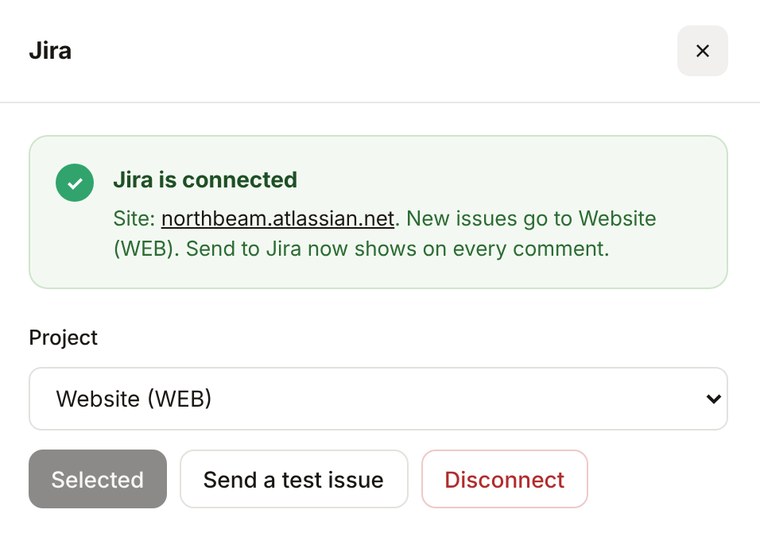
Jira questions.
Pro is $15 a month, or $12 a month billed yearly. Team is $40 a month for 5 people, or $32 billed yearly.
See pricingWhat goes into the issue?
The summary is the comment number, the first line of the comment and the page name. The description has the full comment, who left it, the page, the element it is pinned to, the screen size, the version if there is more than one, and a link that opens the comment on the page. If the reviewer attached a screenshot, a link to it is added too.
Does it work with Jira Cloud and Jira Server?
It works with Jira Cloud (your-team.atlassian.net). Jira Server and Data Center are not supported.
Is anything sent to Jira automatically?
No. Nothing goes to Jira until you press Send to Jira on a comment, so you choose what becomes work.
Can I change the project later?
Yes. Open Jira on the Integrations page and pick another project. New issues go there from then on.
More integrations
Works with the rest of your tools. Connect as many as you like.


Pin feedback to the page. Send it to Jira.
Free to start. Integrations are on Pro and Team.