

Turn website feedback into Trello cards
Paste your board's email address once. Then press Send to Trello on any comment, and it becomes a card on the list you picked.
Website launchFeedback
Doing
What you get
What lands on the card. Enough to act on without opening anything else.
- A clear card title
The comment number, the first line of the comment and the page name.
- The full comment
Every word the reviewer wrote, and who wrote it.
- Where it is
The page, the element the comment is pinned to, the screen size and the version.
- A link back
Open the comment on the page in one click, plus the reviewer's screenshot when there is one.
Set it up
Connect Trello in 4 steps.
- 1
Open the Trello board where comments should go.
- 2
Open the board menu and choose Email-to-board.
- 3
Pick the list new cards land in and copy the address under Email address for this board.
- 4
In HTMLAnnotate, open Integrations, then Trello. Paste the address, press Save, then Send a test.
Keep the board address private: anyone who has it can add cards to that board.
Open Integrations in the app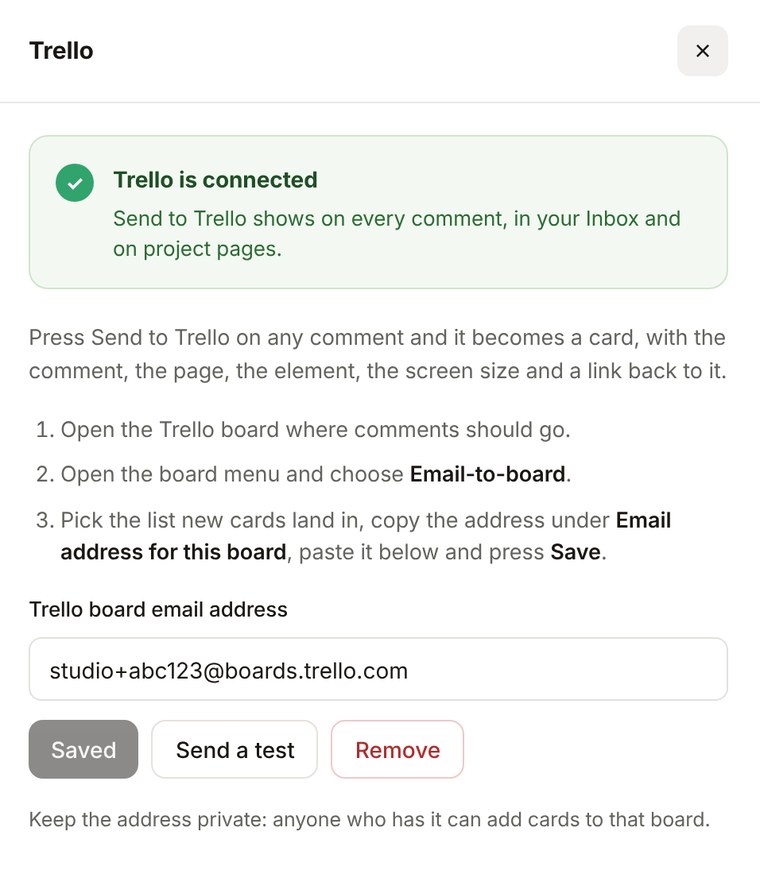
Trello questions.
Pro is $15 a month, or $12 a month billed yearly. Team is $40 a month for 5 people, or $32 billed yearly.
See pricingWhat goes on the card?
The title is the comment number, the first line of the comment and the page name. The description has the full comment, who left it, the page, the element it is pinned to, the screen size and a link back to the comment.
Where does Send to Trello show?
On every comment, in your Inbox and on project pages.
Do I need to sign in to Trello in HTMLAnnotate?
No. Trello gives every board its own email address, and that is all HTMLAnnotate needs.
More integrations
Works with the rest of your tools. Connect as many as you like.


Pin feedback to the page. Send it to Trello.
Free to start. Integrations are on Pro and Team.