

Website feedback in a Discord channel
New comments, replies, approvals and change requests on your pages are posted to a Discord channel, each with a link back to the comment.
#website-feedbackHTMLAnnotate4:12 pm
Maya Chen commented on Copperleaf · Home (#4, Desktop, on heading "Small-batch coffee")
Can the headline mention same-week delivery?
HTMLAnnotate4:20 pm
Sam Okafor replied to #4 on Copperleaf · Home
Agreed, and the button should say Shop now.
HTMLAnnotate5:02 pm
Maya Chen approved Copperleaf · Home
What you get
What gets posted. The same five events, each with a link back to the comment.
- New comments
With the comment number, the screen size, the element it is pinned to and the comment itself.
- Replies
When you, a teammate or a reviewer answers a comment.
- Resolved comments
When a comment is marked done.
- Approvals
When a reviewer approves a version of the page.
- Change requests
When a reviewer asks for changes instead of approving.
Set it up
Connect Discord in 4 steps.
- 1
In Discord, open the channel settings (the gear next to the channel name).
- 2
Choose Integrations, then Webhooks, then New Webhook. Name it HTMLAnnotate.
- 3
Press Copy Webhook URL.
- 4
In HTMLAnnotate, open Integrations, then Discord. Paste the URL, press Save, then Send a test.
You need the Manage Webhooks permission in that server.
Open Integrations in the app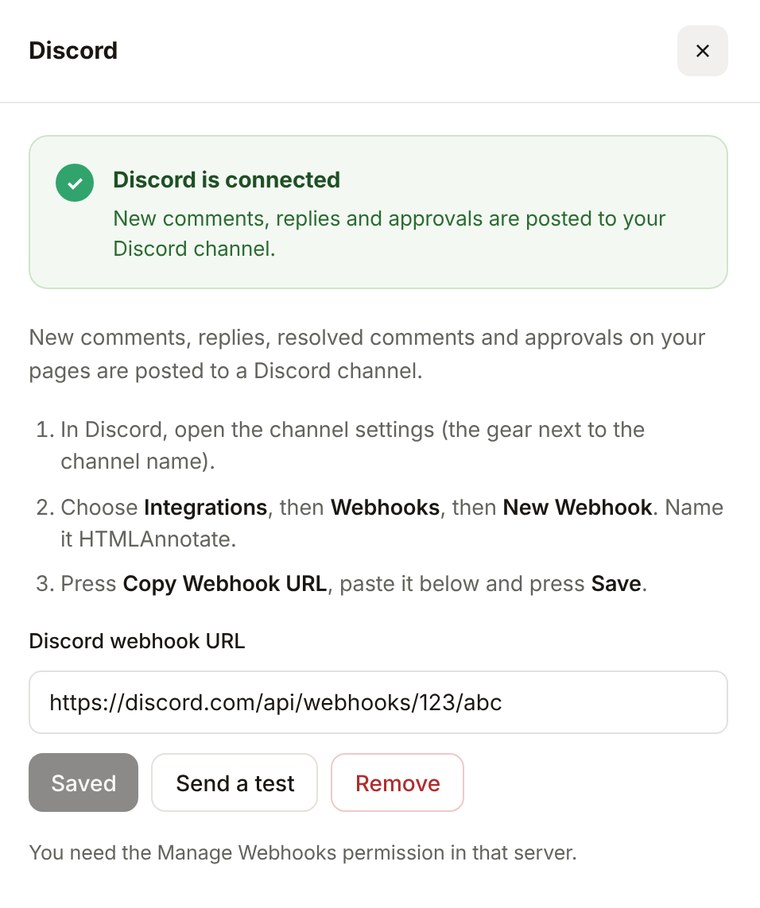
Discord questions.
Pro is $15 a month, or $12 a month billed yearly. Team is $40 a month for 5 people, or $32 billed yearly.
See pricingDo I need to add a bot?
No. HTMLAnnotate posts through a channel webhook, so there is nothing to install in your server.
Will it ping anyone?
No. Messages are posted with mentions turned off, so a comment can never ping a person or a role.
Can I use it with Slack at the same time?
Yes. Slack, Discord and Google Chat can all be connected at once, and each gets the same messages.
More integrations
Works with the rest of your tools. Connect as many as you like.


Pin feedback to the page. Send it to Discord.
Free to start. Integrations are on Pro and Team.